
Why Screen Time Limits Fail Without the Right Infrastructure
The screen time tools that actually work combine network-level controls, physical barriers, and age-appropriate schedules — not willpower alone.
In this article
Picture this: it's 9 p.m. on a school night, and you've said "five more minutes" four times already. Your eight-year-old is still glued to a tablet, and you're too exhausted to fight about it again. You are not alone — and you are not failing as a parent.
According to a 2023 report by Common Sense Media, children ages 8–12 now average nearly five and a half hours of screen time per day outside of school. That figure has roughly doubled since 2015. The American Academy of Pediatrics (AAP) has been sounding the alarm for years, linking excessive, unstructured screen time to disrupted sleep, reduced physical activity, and attention difficulties — particularly in children under six.
The good news? You don't have to win this battle through sheer force of will. A new generation of tools — from smart routers to locking plugs to GPS-enabled kids' watches — gives you real, enforceable structure.
In this article, you'll understand:
1. Why Screen Time Limits Fail Without the Right Infrastructure
The most common reason screen time rules break down isn't bad parenting — it's bad infrastructure. Rules that live only in your head, or in a deletable app on your child's phone, are rules with a built-in escape hatch.
Most app-based parental controls share a fatal flaw: a motivated nine-year-old can uninstall them, reset device settings, or simply switch to a different browser. A 2022 study published in JAMA Pediatrics found that over 60% of parents who used app-only controls reported their child had successfully circumvented them at least once.
The Three Layers of Effective Screen Time Management
Think of screen time control like home security. You wouldn't rely on a single lock. Effective management typically involves:
1. Scheduling — automated time windows when devices can and cannot connect 2. Content filtering — blocking inappropriate websites, apps, or search results 3. Physical barriers — hardware that cuts power or connectivity regardless of software workarounds
When you combine even two of these layers, compliance rates go up dramatically — not because children suddenly agree, but because the path of least resistance becomes following the rules.
2. Network-Level Wi-Fi Control: The Foundation of Any Screen Time Plan
A parental-control router is the single highest-leverage tool most families can invest in, because it governs every Wi-Fi-connected device in your home simultaneously — phones, tablets, gaming consoles, smart TVs, and laptops — without requiring you to install anything on each device individually.





Gryphon Guardian Mesh WiFi Router and Parental Control System with Content Filters and Advanced Cyber Security
- AFFORDABLE CONNECTIVITY & SECURITY – Beef up your mesh network’s coverage, add extra security to your system,
- COMPREHENSIVE PARENTAL CONTROLS – Schedule screen time, monitor online searches and create a safe Internet exp
- WIFI WHERE YOU NEED IT – Enjoy reliable connectivity throughout your whole apartment or improve WiFi speeds in
The Gryphon Guardian Mesh WiFi Router is a solid entry point for families in smaller homes or apartments. At $59.99, it combines mesh Wi-Fi coverage (up to 1,500 sq. ft. per unit) with a central parental control dashboard where you can schedule screen time, monitor online searches, and block specific apps or websites. Because control sits at the router level, there is nothing on your child's device for them to delete or disable.
What to Look for in a Parental Control Router
Parents should think of their home Wi-Fi router the way they think of the front door — it's the first line of defence, and it should be locked by default.
— Common Sense Media, Family Tech Planners Guide (2023)
For larger homes or families with heavier bandwidth demands, the Gryphon AX Mesh WiFi 6 Router steps up to WiFi 6 speeds (4.3 Gbps), covers 3,000 sq. ft. per router, and adds next-generation firewall protection alongside individualized time limits per child profile. At $299.00, it's a bigger investment — but for households with five or more connected devices per child, the performance and control depth justify the cost.
Action step: Log into your current router tonight and check whether it has any built-in parental control features. Most modern routers have basic scheduling — you may already own a tool you haven't activated.
3. Whole-Home Screen Time Scheduling Without Replacing Your Router
Not every family wants — or needs — to replace their existing router. If your internet service provider's modem-router combo is working fine, a dedicated add-on device can layer parental controls on top of your current setup.

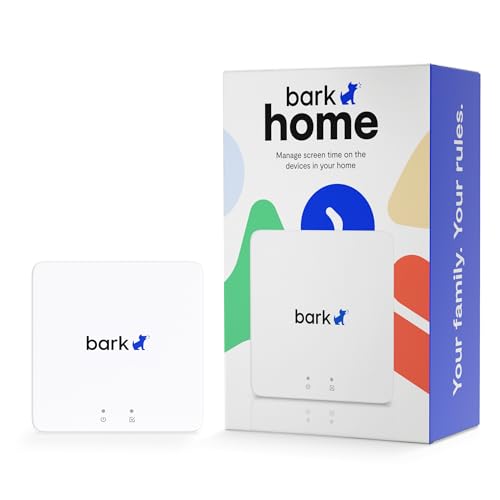
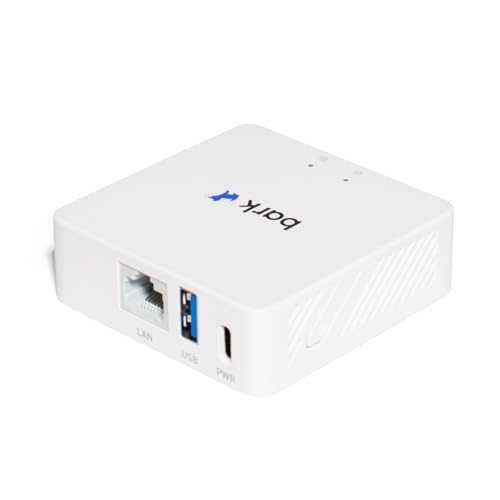
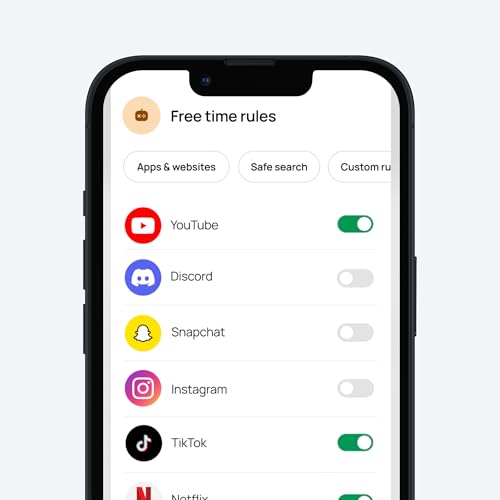
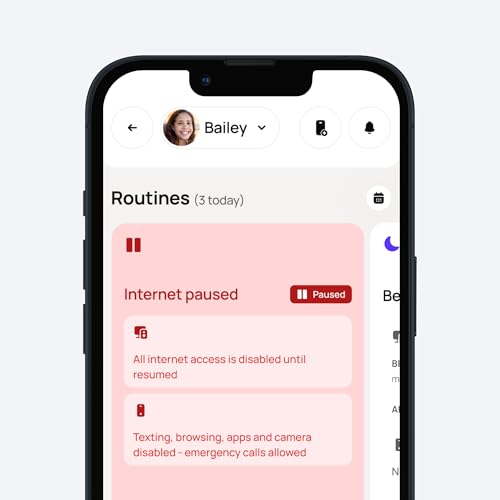
Bark Home — Parental Controls for Wi-Fi - Manage Screen Time, Block Apps, and Filter Websites for Kids - Phones, Tablets, Gaming Consoles, and More
- BARK HOME includes in-home protection for free with purchase of the hardware — no paid subscription needed.
- MANAGE the Wi-Fi-connected devices in your house, including TVs, gaming consoles, tablets, computers, and smar
- CREATE custom daily screen time schedules to help set healthy boundaries around device use.
The Bark Home takes exactly this approach. For a one-time hardware cost of $79.00, it plugs into your existing network and gives you management over every Wi-Fi-connected device in the house — including TVs, gaming consoles, tablets, computers, and smartphones. Crucially, Bark Home includes in-home protection with no ongoing subscription fee, which makes it one of the most cost-effective long-term solutions on this list.
How Bark Home Differs from a Full Router Replacement
Where a parental-control router replaces your existing hardware entirely, Bark Home works alongside it. This means:
The trade-off is that Bark Home's coverage is limited to your home Wi-Fi. Once your child's phone switches to cellular data outside the house, the controls don't follow. For younger children who don't yet have cellular plans, this is rarely a problem. For tweens with smartphones, you'll want to pair it with a mobile monitoring solution.
The AAP specifically recommends keeping screens out of children's bedrooms and establishing consistent "off" times, particularly in the hour before sleep. A router-level schedule makes this automatic rather than a nightly negotiation.
Action step: Map out your child's device list this week — every tablet, console, phone, and smart TV. A tool like Bark Home is most powerful when you've accounted for every connected device in the home.
4. Router-Plus-App Systems That Follow Your Child Off Home Wi-Fi
The gap between home Wi-Fi protection and mobile protection is where most parental control systems fall apart. Your child leaves the house, their phone switches to cellular data, and your router-based rules no longer apply.

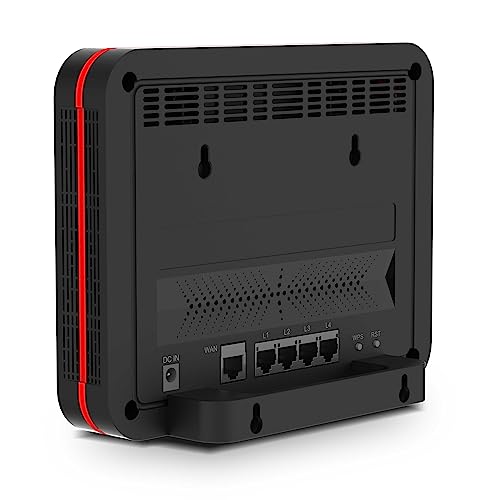
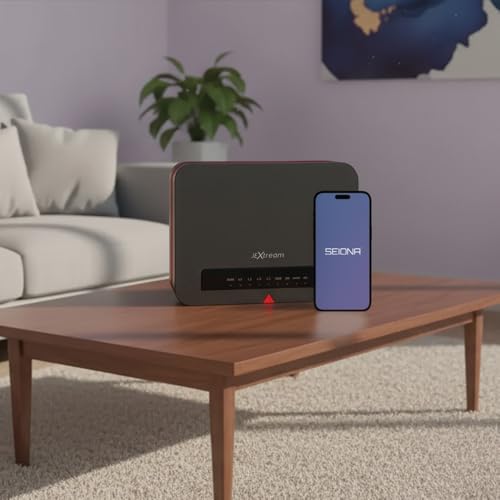
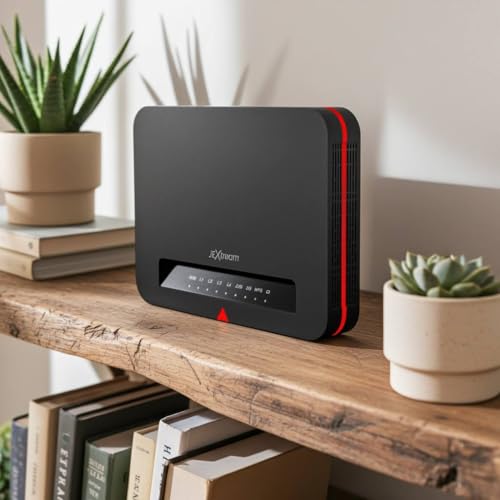
FX20 Parental Control Router + SEIONA App | Protect Every Device — Screen Time, App Blocking & Content Filtering | 3,000 sq ft | Can't Be Bypassed by Kids
- COMPLETE PARENTAL CONTROL SYSTEM FOR HOME + MOBILE: The JEXtream FX20 Wi-Fi router paired with the free SEIONA
- KIDS CAN'T BYPASS IT — NETWORK-LEVEL PROTECTION: Most parental control apps can be deleted or worked around by
- GEOFENCING & REAL-TIME LOCATION ALERTS: Know the moment your child arrives at school, leaves a safe zone, or r
The JEXtream FX20 Parental Control Router addresses this directly. The FX20 is a dual-function system: a home Wi-Fi router (covering up to 3,000 sq. ft.) paired with the free SEIONA app, which extends parental controls to mobile devices even when they're on cellular data. The combination means your content filters, app restrictions, and screen time schedules travel with your child.
The Bypass Problem — and Why Network-Level Wins
Most app-based controls can be circumvented by a determined child in one of three ways:
1. Uninstalling the app 2. Using a VPN to reroute traffic 3. Switching to a different browser or device
The FX20 filters content before it reaches your home network — there's no app on the child's device to uninstall, and VPN workarounds are blocked at the router level. The SEIONA app's geofencing adds a location layer: you receive instant alerts when your child arrives at school, leaves a safe zone, or reaches home.
At $99.99, the FX20 sits in the mid-range of parental control routers and includes features that typically require a paid subscription elsewhere.
Action step: Check whether your child's phone has a VPN app installed. If it does, that's a sign your current app-based controls have likely already been bypassed — and it's time to move control to the network level.
5. Physical Screen Time Enforcement: When Software Isn't Enough
For gaming consoles and televisions specifically, software controls have a particular weakness: many can be reset to factory settings, or accessed through secondary accounts that don't have parental restrictions applied. A physical solution removes this option entirely.
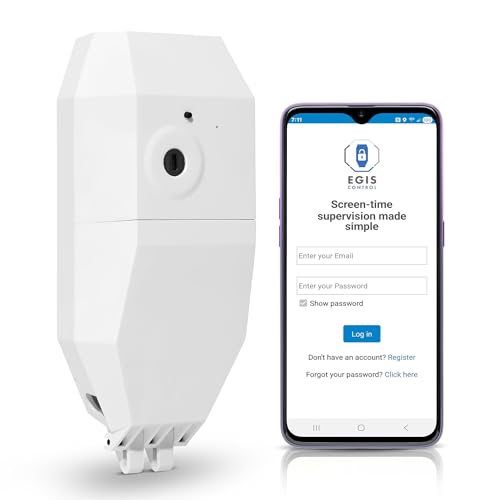
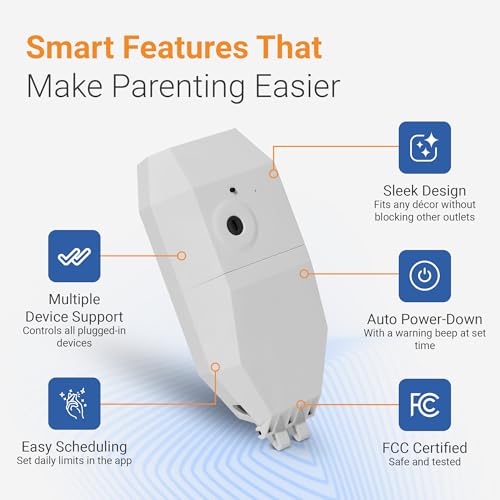
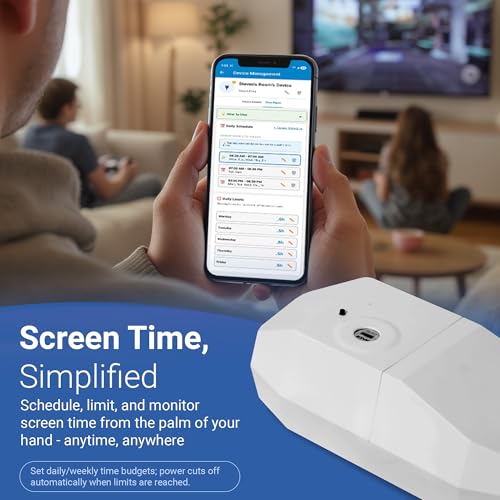
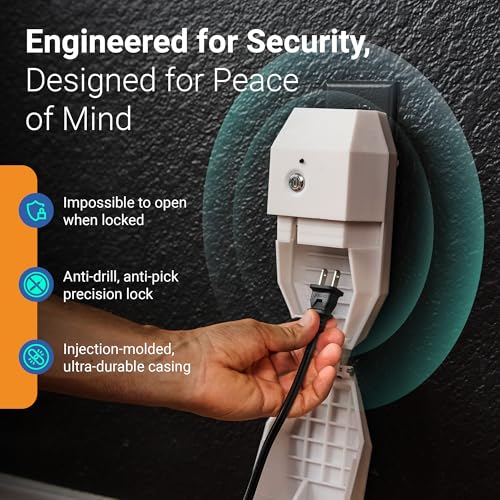
Locking Smart Plug for Kids' Screen Time – Supports Consistent Screen Time Boundaries for TVs, Gaming Consoles & Computers – No Monthly Fees
- SUPPORTS SCREEN TIME BOUNDARIES THAT HOLD Whether you’re setting screen-time rules for the first time or repla
- WORKS WITH XBOX, PLAYSTATION, PC & TV – Supports PlayStation 5, Xbox Series X/S, gaming PCs, smart TVs, and VR
- CORDS OUT OF SIGHT, OUT OF MIND – Connected plug heads and portions of attached cords stay physically secured
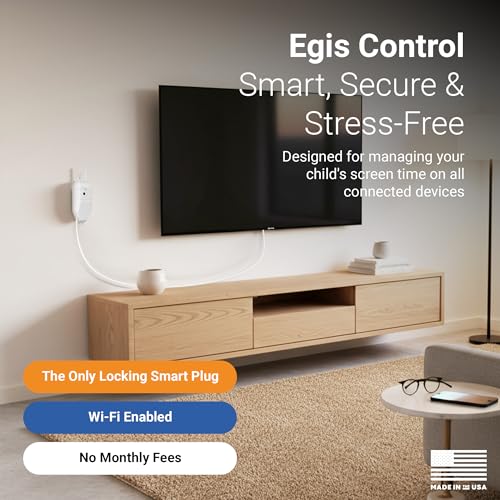
The Egis Control Locking Smart Plug takes a refreshingly direct approach: it physically locks the power cord of any device — PlayStation 5, Xbox Series X/S, gaming PC, smart TV, or VR headset — inside a tamper-resistant enclosure. When screen time is over, power cuts off. There is no password to guess, no settings to reset, and no workaround that doesn't involve physically breaking the device.
How the Egis Control Works in Practice
- Power cords sit secured inside the locking case until you unlock via the app or a backup key - A warning alert notifies your child before power shuts off, allowing them to save progress - Schedules run automatically without you needing to be in the room - No monthly subscription fee
At $129.99, this is the most expensive single-device solution on this list, but for families where gaming is the primary battleground, it pays for itself in reduced conflict within the first week.
Action step: Identify the one device in your home that causes the most screen time conflict. Start there. A targeted physical solution for that single device often resolves 80% of the daily friction.
6. GPS Smart Watches for Kids: Safety and Screen Time in One Device
For children ages 3–15 who are becoming more independent — walking to school, attending activities, spending time at a friend's house — a kids' smart watch solves two problems simultaneously: it keeps them reachable without giving them a full smartphone, and it naturally limits screen exposure to a small-format, function-specific device.



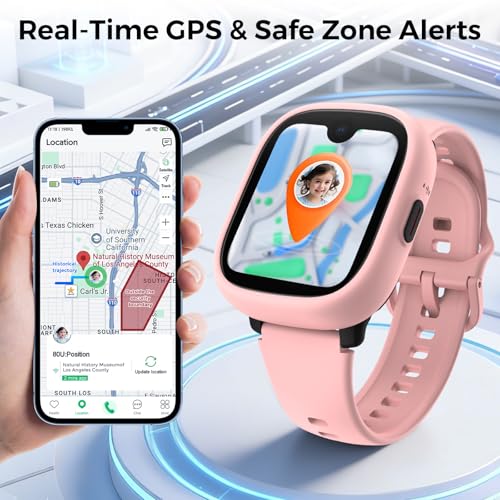
MIRO Kids Smart Watch with SIM Card Slot, GPS Tracker, Call & Video Call, Real-Time Location, Safe Zone Alert, Parental Control, School Mode, Gift for Boys Girls Age 3-15 (Pink)
- 【Stay Connected Anytime, Anywhere】:This kids’ smart watch supports a SIM card, allowing your child to make and
- 【Video Call & Life Recording】:Equipped with a clear camera, this kids’ smart watch supports smooth video calls
- 【Real-Time Location & Safety】:This kids’ smart watch comes with precise GPS tracking, so you can check your ch
The MIRO Kids Smart Watch is built around this philosophy. It supports a SIM card for calls and video calls without requiring Wi-Fi, includes precise GPS tracking with safe zone alerts, and gives children a camera for capturing moments — without the open internet access, social media, and app ecosystem of a full smartphone.
Why a Kids' Watch Is a Screen Time Strategy, Not Just a Safety Tool
Handing a child a smartphone to "stay in touch" is one of the most common ways families accidentally expand screen time beyond intended limits. A dedicated kids' watch threads the needle:
The MIRO watch's school mode is particularly useful — it automatically restricts the watch to calls only during school hours, so it doesn't become a classroom distraction.
Delaying smartphone access until age 14 or later is associated with significantly better mental health outcomes in adolescence.
— Jonathan Haidt, *The Anxious Generation* (2024)
Action step: If your child is asking for their first phone, present the MIRO watch as the answer. It meets their real need (staying connected, feeling grown-up) without opening the door to unrestricted internet access.
Comparison Table: Which Screen Time Tool Fits Your Family?
| Tool Type | Best Age Range | Primary Benefit | Main Limitation | Recommended Product | Price Range |
|---|---|---|---|---|---|
| Add-on Wi-Fi controller | 3–12 | No router replacement needed; no subscription | Home Wi-Fi only; no mobile coverage | Bark Home | $79 |
| Entry-level parental control router | 5–12 | Whole-home control; affordable | Smaller coverage area (1,500 sq ft) | Gryphon Guardian | $59.99 |
| Router + mobile app system | 6–15 | Follows child off home Wi-Fi; geofencing | Requires app setup on child's device | JEXtream FX20 | $99.99 |
| Premium mesh Wi-Fi 6 router | 5–15 | Fastest speeds; per-profile controls; large homes | Higher cost | Gryphon AX | $299 |
| Physical locking smart plug | 4–14 | Cannot be bypassed; works on any plug-in device | Single device only; higher per-device cost | Egis Locking Smart Plug | $129.99 |
| GPS kids' smart watch | 3–15 | Replaces smartphone; GPS + calls without open internet | Requires SIM card plan | MIRO Kids Smart Watch | $124.99 |
Expert Insights on Screen Time and Child Development
Frequently Asked Questions
Conclusion
Parenting in a screen-saturated world is genuinely hard. The guilt you feel when screen time creeps past the guideline, the exhaustion of enforcing the same rule for the hundredth time, the worry about what your child is actually watching — all of it is real, and none of it means you're doing it wrong.
What it means is that you need better infrastructure, not more willpower. The tools in this article — from the network-level protection of the JEXtream FX20 to the satisfying physicality of the Egis Locking Smart Plug — exist precisely because this is a structural problem that deserves a structural solution.
The most important screen time limit is the one that actually holds. Pick one tool today, set it up this week, and let the technology do the enforcing so you can get back to being the parent — not the screen-time police.
If this helped you, save it, share it with another parent who needs it, and subscribe to TinyMindsWorld for more clinically grounded, parent-first guidance.
Sources & References
- Common Sense Media. "The Common Sense Census: Media Use by Tweens and Teens." 2023. https://www.commonsensemedia.org/research/the-common-sense-census-media-use-by-tweens-and-teens-2023
- American Academy of Pediatrics. "Media and Young Minds — Family Media Plan." Pediatrics. 2016 (reaffirmed 2023). https://www.aap.org/en/patient-care/media-and-children/
- Radesky, J., et al. "Digital Media and Developing Minds." JAMA Pediatrics. 2022.
- Twenge, J.M. "iGen: Why Today's Super-Connected Kids Are Growing Up Less Rebellious, More Tolerant, Less Happy." Atria Books. 2017.
- Haidt, J. "The Anxious Generation: How the Great Rewiring of Childhood Is Causing an Epidemic of Mental Illness." Penguin Press. 2024.
- World Health Organization. "Guidelines on Physical Activity, Sedentary Behaviour and Sleep for Children Under 5 Years of Age." 2019. https://www.who.int/publications/i/item/9789241550536
- American Academy of Pediatrics. "American Academy of Pediatrics Announces New Recommendations for Children's Media Use." AAP News. 2016. https://www.aap.org/en/news-room/news-releases/aap/2016/aap-announces-new-recommendations-for-media-use/
Frequently Asked Questions
What is the recommended screen time for a 3-year-old?
Can my child bypass a parental control router using a VPN?
What's the difference between Bark Home and a parental control router?
At what age should I give my child a smartphone?
Does the Egis Control Locking Smart Plug work with all gaming consoles?
How do I set up screen time limits without constant conflict?
Is it safe for a young child to wear a GPS smart watch all day?
Was this helpful?
Thanks — your feedback helps us pick what to write next.